Making RRM Work

There’s been a lot of good discussion within the Wi-Fi community recently about the viability of radio resource management (RRM), or the automatic selection of channels and Tx power settings by proprietary vendor algorithms. At Mobility Field Day 1 there was this excellent roundtable.

Personally, I usually fall into the static design camp, for many of the same reasons as others. I don’t want RRM to change the carefully tuned design I put in place and create an unpredictable RF environment, I’ve seen RRM do some very peculiar things like put adjacent AP’s on the same channels or crank up the Tx power of 2.4 GHz radios in an HD environment, RRM doesn’t disable 2.4 GHz radios when CCC is present, and it doesn’t plan DFS channels properly. Still, I’ve tried to keep an open mind.

Static designs have their limitations too. Statically designed WLAN’s can’t react to new neighboring networks contending for the same airtime, or new sources of RF interference that weren’t there when the static design was developed. It’s a real benefit of RRM that it does automatically correct for these problems.

Let me propose a hybrid approach that uses static design to handle the things that RRM does poorly, while still allowing RRM to react to the changing RF environment.

Static Design Elements

  • Tx power levels should be statically assigned. Once finely tuned as part of the design process, why would they ever need to change?
  • Excess 2.4 GHz radios in high density environments should be manually disabled because RRM simply won’t do this.
  • DFS channels should be statically planned. RRM can clump DFS channels near one and other, resulting in a 5 GHz dead zone for clients without DFS support. Also, because of these clients, DFS channels should only be used when non-DFS channels are all already deployed. Therefore, statically plan DFS channels when needed in areas where non-DFS channels create secondary coverage, and let RRM dynamically plan the other bands. It’s less likely to have a neighbor or transient hotspot appear in the DFS bands anyway.
  • Set channel channel bandwidth statically. The design process includes considering the capacity requirements of the WLAN to determine the appropropriate 5 GHz channel bandwidth. RRM algorithms don’t know what your capacity requirements are. 2.4 GHz should always be 20 MHz.

Things Left to RRM

  • 2.4 GHz channel planning, once excess radios are disabled. Channels 1, 6, and 11 only, of course.
  • 5 GHz channel planning, once DFS channels are statically assigned.
  • That’s all.

The benefit of this approach is that it addresses many of the shortcomings of RRM while still retaining its main benefit: the WLAN can dynamically react to RF interference and transient neighbors by moving affected AP radios to clear spectrum. The things that RRM can’t do or does poorly are simply removed from its control.

Even within these constraints, there are still some vendor’s RRM algorithms I trust more than others. And even those I trust enough to try this with, I’d still want to monitor regularly to make sure the WLAN hasn’t turned into the RRM trainwreck the I’ve seen all too often when RRM is given free reign.

Why K12 Schools Need Wi-Fi Design

Chalk drawing of WIFI

Enterprise Wi-Fi is expensive, very expensive. For schools with limited budgets and a responsibility to be good stewards of tax dollars, it is important to get it right, without spending more than necessary on the initial deployment, ongoing support, or fixing costly mistakes. Any savings can be used in other ways to improve education, so unnecessary spending on Wi-Fi can have an impact on the quality of education in schools.

That’s why it is critical for schools to work with Wi-Fi professionals to develop a sound design for the network before it is purchased and deployed. Fixing mistakes after the fact costs a lot of money. The usual “fix” of installing extra access points in areas where performance is poor can often make the situation worse, when the real solution might be to remove an AP or correct a bad channel plan.

What often happens is this: A vendor talks the school into purchasing one AP per classroom and then the channel planning is left up to auto-channel algorithms (known as RRM, or radio resource management). This is a very simple and seemingly easy way to get Wi-Fi in schools that doesn’t involve the headaches of procuring CAD drawings, performing multiple site surveys, collecting client device data, and other things that delay the installation of the Wi-Fi network and increase the up-front costs.

Don’t do it!

The big problem here is that this is extremely inefficient. Do schools need one AP per classroom? Some do, some don’t. You’ll only find out by doing a proper network design. Maybe the design process reveals that a school only needs one AP per two classrooms. A school like this that doesn’t bother with a design and just does one AP per classroom has spent 100% more money than it needed to.

Capacity issues aside, what about channel planning and radio transmit power control?Nearby AP’s on the same channel interfere with each other. Vendors love to tout their RRM as effective means to automatically set these controls optimally. Just turn it on and let the magic happen.

The truth is, RRM just can’t be trusted. It may work for a while, and then it changes something and it doesn’t. My experience has shown that RRM is fine for simple networks with few neighbors, but in the high density, busy RF environment of K12 schools it often fails miserably. Neighboring AP’s end up on the same channel resulting in interference with one and other. Transmit power goes up and down unpredictably. Your Wi-Fi network is an unpredictable moving target. What you measured and validated at one location one day is different the next day, and so on. The ongoing cost of supporting a network in this state is much higher than one that began with a proper design.

While some vendors’ RRM is better than others, no vendor is immune to this. A better solution is a proper design where channels and transmit power are determined by a Wi-Fi professional who is informed by years of experience and site survey data that RRM algorithms can’t factor into their decision making.

It is critical that schools include a proper Wi-Fi design in their Wi-Fi deployments to save tax dollars that would better be spent on other educational needs, and prevent many future headaches that result from over/under capacity networks and bumbling RRM algorithms. The Wi-Fi design process avoids these issues, and leaves schools with efficient, stable networks and the confidence in knowing that the network was validated against their needs, with the data to prove it.

Beyond the tax dollars, in a 21st century classroom, what is the true cost of poor Wi-Fi?


This is How Wi-Fi Actually Works

I decided to write this blog because there appears to be a very common misunderstanding about how Wi-Fi works among end-users and even many network administrators as well. Instead of repeating myself, I can share this link with folks that need a little lesson in 802.11 operation.

Wi-Fi is does not work like AM/FM broadcast radio.

Well, in some ways it does, Wi-Fi radios transmit and receive radio frequency energy (RF) just like AM/FM stations do, but it’s operation is much more complex. If you are stuck in the AM/FM radio analogy, you’ll make several mistakes with Wi-Fi, such as:

  • Coverage is considered, not capacity. Again, if Wi-Fi were a one-way radio broadcast like AM/FM radio, you’d only need to provide a strong “Wi-Fi signal” for everything to work well. This leads you down this next path.
  • The “Wi-Fi signal” (using this term might be a tell that the person speaking is stuck in the AM/FM radio analogy) is too low, so crank up the AP’s transmit power to make it louder.
  • Every problem is thought of as an infrastructure problem, client radios are not considered when troubleshooting.
  • Getting hung up on the vendor’s name that is on the access point, without considering what is much more crucial, the overall design that went into the network.

How Wi-Fi Actually Works

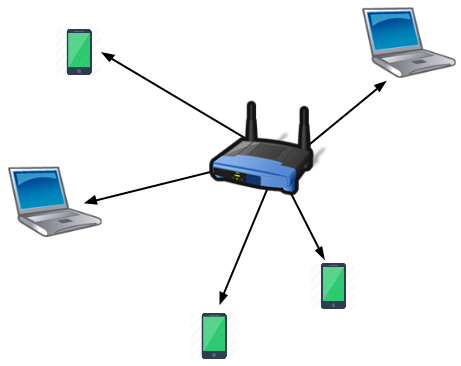
Wi-Fi is not a one-way broadcast from AP to clients like AM/FM radio. This is not how Wi-Fi works:

badfi
Nope. Not like this.


It’s a network. The AP and clients connected to it must all be able to transmit and receive to and from each other, more like this:

goodfi
Note that while the intended destination of a transmitted frame is usually just one other radio, real RF transmissions radiate in all directions, and are heard by all clients.


Because they are all operating on the same channel, each client or AP must wait for the others to stop transmitting before it can transmit. It works just like Walkie Talkie radios. Only one radio can transmit at a time, everyone else must listen and wait. Additionally, they all need to be close enough to hear each other so that they do not transmit overtop of each other, causing interference that corrupts the communications. The channel they are using is what’s called a shared medium.

If they can’t all hear each other, they will transmit overtop of each other which results in corrupted frames (not packets, Wi-Fi operates at layer 2) that must be retransmitted. The bigger the cell, the worse this problem becomes (the hidden node problem). So when you crank up the transmit power of an AP to increase its coverage, you exacerbate this problem, because the AP is now serving clients that are further apart from one and other.

In many networks, the majority of Wi-Fi clients are smartphones with low-power radios and meager antennas. They already have difficulty hearing other clients further away in the cell. For networks like this, performance can be greatly improved by lowering the transmit power of the AP rather than increasing it.

Further, because the channel is a shared-medium, it has limited capacity. There is only so much available capacity to transmit in a single channel. Faster clients can transmit, well faster, and therefore use less of that capacity, known as airtime. Older or cheaper clients that are slower use more airtime to transmit the same amount of data. It doesn’t matter what vendor’s name is on the access point, airtime is airtime. Once a channel is saturated, that’s it. You can’t add more clients to it without leading to degraded performance. You can’t alter the laws of physics. At this point you need to add another AP to utilize the capacity of a different channel, or replace slow clients with faster ones.

Regardless, it’s worthwhile to intuitively understand the nature of Wi-Fi networks, so that these common pitfalls can be avoided. Many other Wi-Fi best practices that I haven’t outlined here stem from this foundational knowledge. Based on this, can you think of other things that might affect Wi-Fi performance?

Footnote

This is a simplification of 802.11 operation meant to give those new to the subject a casual understanding of how it works. Sometimes 802.11 frames are broadcast, one-way-only, from the AP to all clients in the network. Some management frames and broadcast frames from the wired network are broadcast this way. The important point to remember is that this is the exception, not the rule, and if all clients cannot hear each other, there is still the possibility that this broadcast traffic could be corrupted by another client transmitting over it.